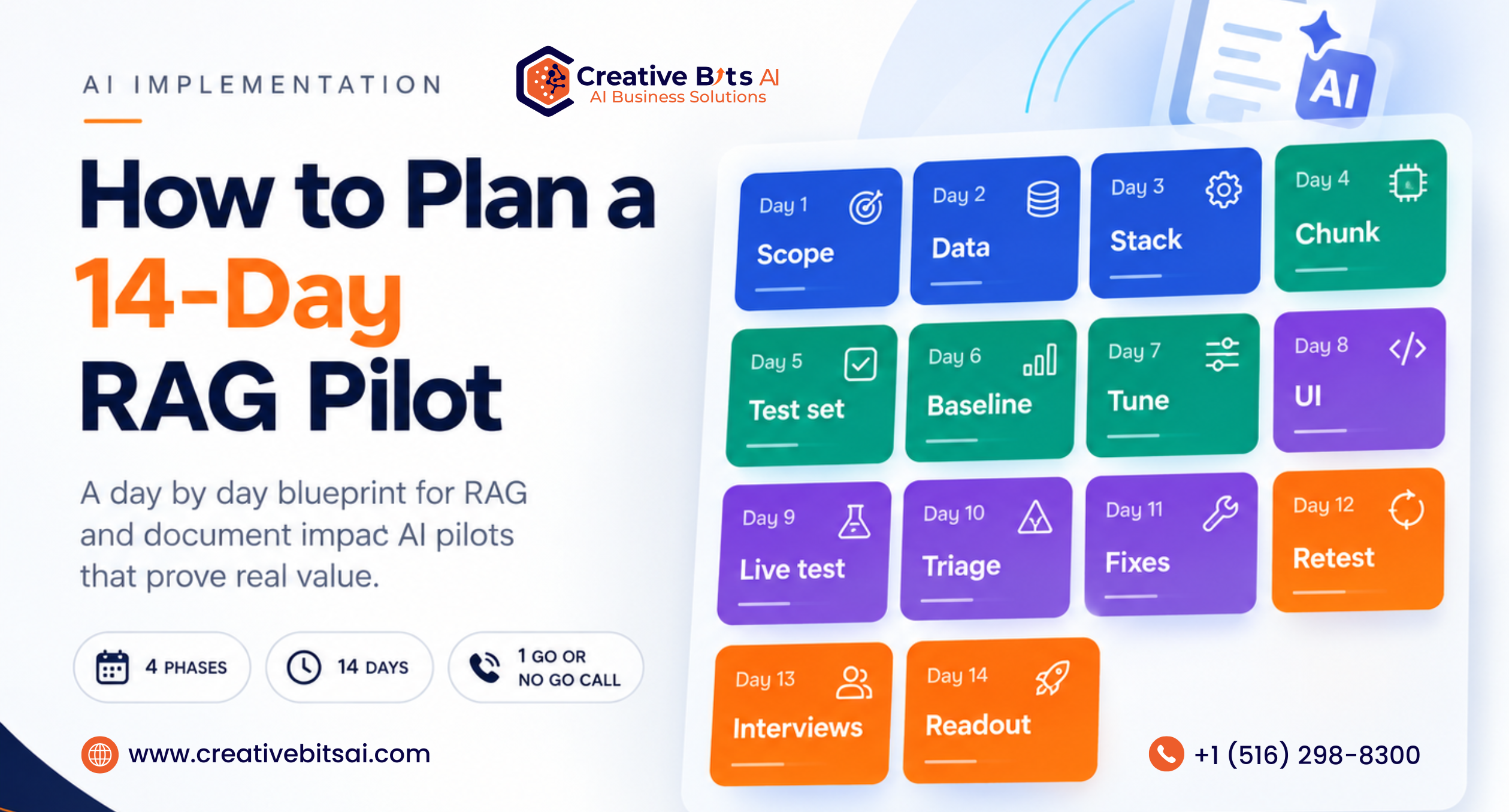
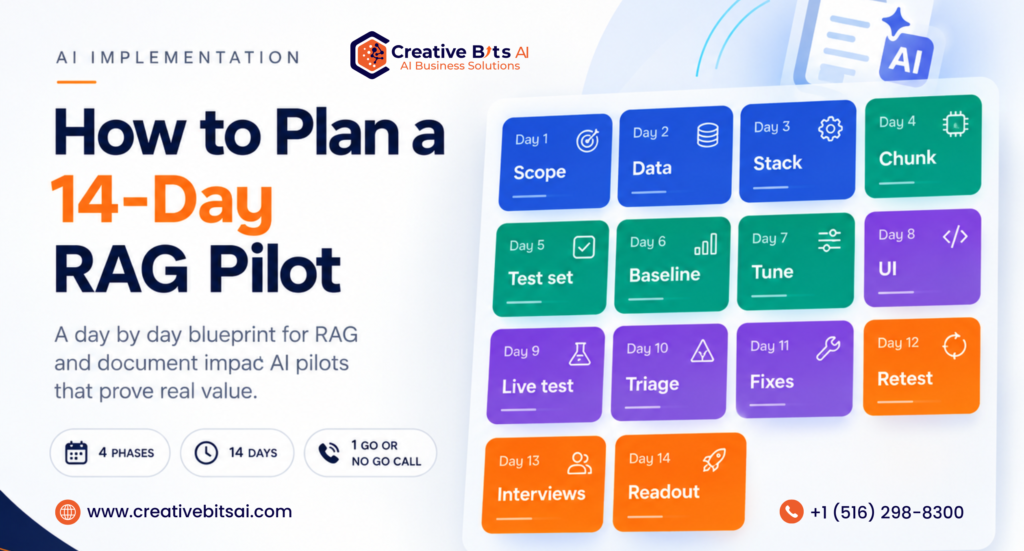
A RAG pilot is a two-week, tightly scoped test that proves whether retrieval-augmented generation can accurately and quickly answer real questions from your approved documents at a sensible cost. Run it in four phases: alignment and setup (Days 1 to 3), ingestion and baseline (Days 4 to 7), user testing (Days 8 to 11), and evaluation and roadmap (Days 12 to 14). Keep it to one use case, 50 to 100 documents, three to five testers, and a 20 to 30-question test set, and end with a go, iterate, or stop decision.
Here is a question worth asking before you spend a single dollar on generative AI. If your pilot succeeds, will anyone be able to prove it?
For most companies, the answer is no. Gartner predicted that at least 30% of generative AI projects would be abandoned after proof of concept by the end of 2025, pointing to poor data quality, inadequate risk controls, escalating costs, and unclear business value. MIT’s NANDA initiative went further in 2025, reporting that only about 5% of custom enterprise AI tools were reaching production despite an estimated $30 to $40 billion in enterprise spending. The researchers called it a learning gap: tools that never adapted to how the business actually works.
Neither report blames the models. They blame the way pilots are run. Scope is vague, success is never defined, the test data is whatever was lying around, and the final meeting is a demo instead of a decision.
A well-planned RAG pilot fixes that. In 14 days, you can prove whether AI can answer real questions from your own approved documents, find out exactly where your data breaks, and learn whether your people will actually trust it. This guide gives you the day-by-day blueprint we use, the metrics that matter, and the technical choices that separate a pilot that scales from one that stalls.
What a 14-day RAG pilot should prove, and what it should not
Retrieval-augmented generation, or RAG, connects a large language model to your own documents. When someone asks a question, the system first retrieves the most relevant passages from your approved content, then asks the model to answer using only those passages, ideally with citations back to the source. The model is not retrained. Your knowledge stays where it is, and you can update it whenever you like.
A RAG pilot is not a production build. You are not integrating every system, hardening every edge case, or rolling out to the whole company. You are answering three questions with evidence:
- Can it find the right information? Retrieval quality is the foundation. If the right passage never reaches the model, nothing downstream can fix it.
- Can it answer faithfully? Answers must stay true to the source and admit when the source does not contain the answer.
- Will people use it? A technically accurate system that testers do not trust is still a failed pilot.
Everything in the next two weeks exists to answer those three questions. If an activity does not help answer one of them, it can wait for production.
Choose your pilot track: RAG assistant or document impact
Not every document problem is a question-and-answer problem. Before you plan the days, decide which of two tracks you are running. Both follow the same 14-day structure, but they measure very different things.

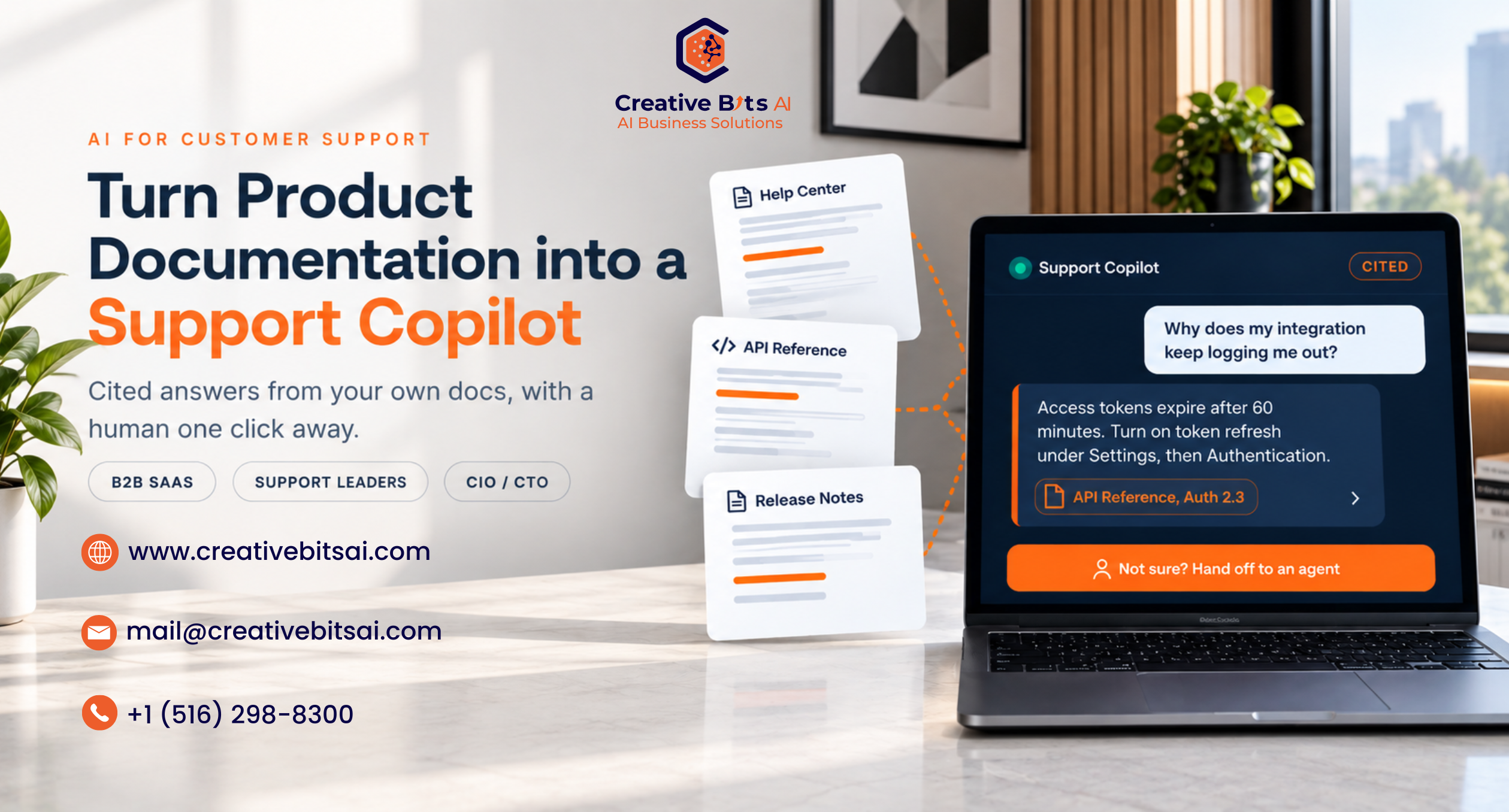
The RAG assistant track is the one most people picture: a chat interface that answers questions like “What is our travel reimbursement limit?” or “How do I rotate an API key?” from approved sources. We explored the customer-facing version in our guide to turning product documentation into an AI support copilot.
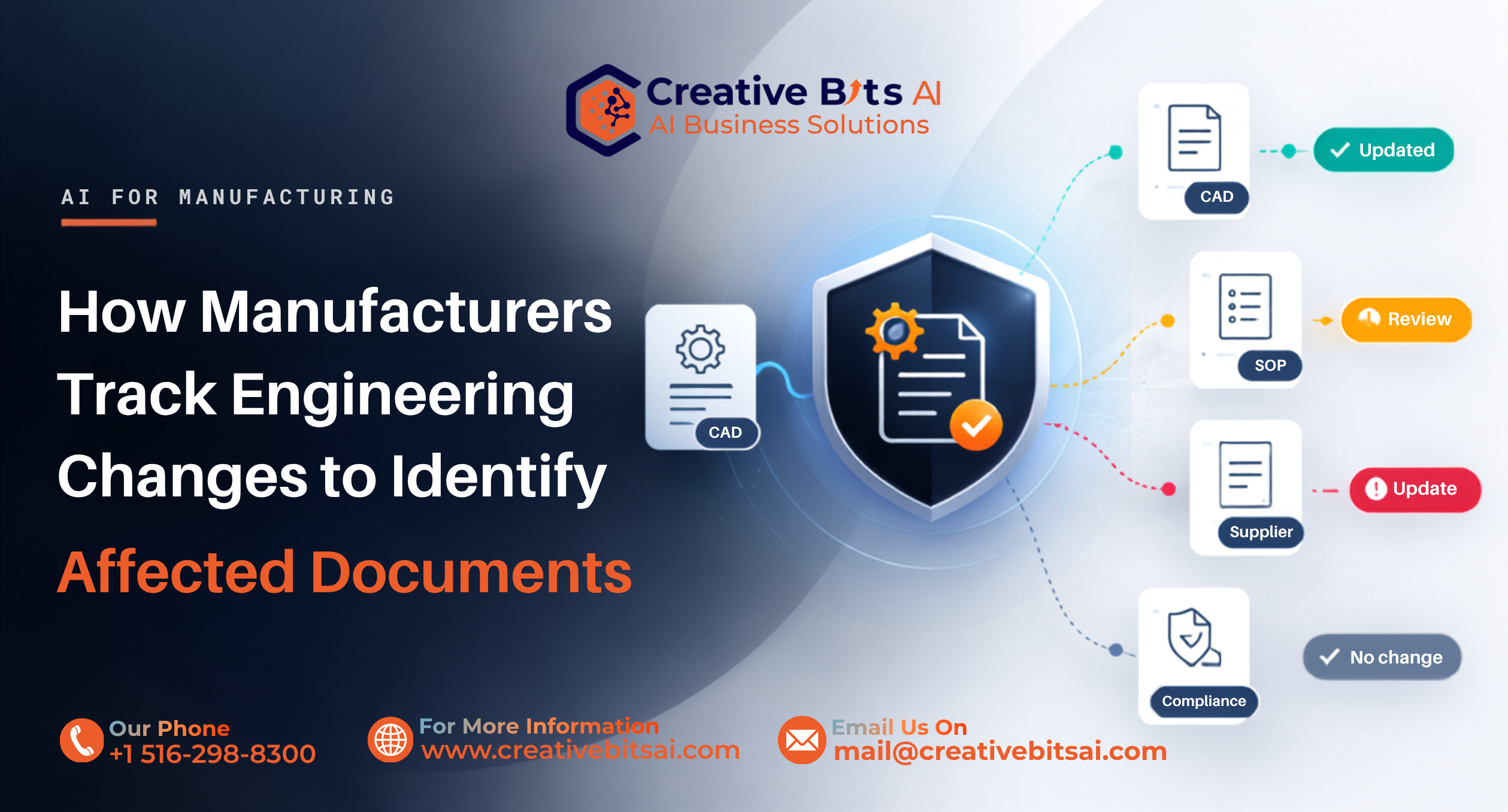
The document impact track solves a different problem. When something changes, such as an engineering change, a new regulation, or an updated policy, which of your hundreds of documents are affected? Here, the AI reads the change, compares it against your document set, and identifies potentially affected documents for a person to review. For manufacturers, this is the heart of engineering change impact analysis, and the best ground truth is history. Pick a past change where your team already knows exactly which work instructions, drawings, and inspection plans had to be updated, then see whether the AI finds the same list. We go deeper in our article on how manufacturers identify every document affected by an engineering change and how conversational AI is closing the shift gap in manufacturing.
In both tracks, the AI supports human review. It surfaces, ranks, and cites. People decide.
Before day one: three questions that shape your RAG pilot
Every successful pilot we have run started with the same three questions. Answer them honestly, and most of your scope decisions will make themselves.
1. What type of documents will you be testing?
PDFs, legal contracts, technical manuals, HR policies, scanned forms, and spreadsheets all behave differently inside a RAG pipeline. Clean digital text with clear headings is the easy case. Scanned PDFs need optical character recognition. Technical manuals carry tables, diagrams, and part numbers that basic parsers flatten into nonsense. Contracts are long, heavily cross-referenced, and full of defined terms, so a passage pulled out of context can mean something very different from the full clause. Your document type decides your parsing tools, your chunking strategy, and how much of Day 2 goes to cleanup.
2. Do you have a preferred cloud provider or AI platform in mind?
If your company already runs on Microsoft Azure, AWS, or Google Cloud, the fastest and most defensible pilot usually lives there, because identity, security reviews, and data residency are already solved. Azure AI Search, Amazon Bedrock Knowledge Bases, and similar managed services give you ingestion, vector search, and model access out of the box. Open source frameworks such as LlamaIndex and LangChain give you more control and portability in exchange for more setup. There is no universally right answer, but there is a wrong one: a platform your security team will never approve for production.
3. What is the primary business goal you want this AI to achieve?
Faster answers for employees, fewer support tickets, quicker onboarding, fewer review hours after an engineering change, or lower compliance risk? Pick one. The goal determines your success metrics, your testers, and what “good” means on Day 14. A pilot with three goals usually proves none of them.
The 14-day RAG pilot at a glance
Here is the full plan on one page: four phases, four decision gates, and a single go, iterate, or stop call at the end.
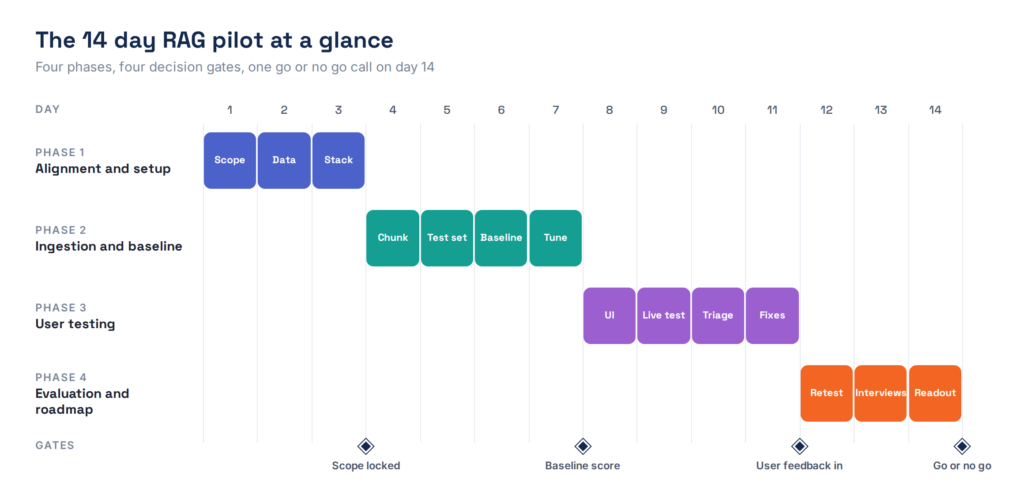
Figure 1. The 14-day RAG pilot plan, with a decision gate at the end of each phase.
Phase 1: Alignment and setup (Days 1 to 3)
The biggest risk to a short pilot is scope creep. Spend the first 72 hours locking down your use case, your data, and your infrastructure, and resist every request to “just add one more document set.”
Day 1: Scope and success metrics
Define one specific use case, such as HR policy questions or quarterly financial report search for the finance team. Then, before anything is built, write down what success looks like. Skip this step and Day 14 turns into a debate about opinions instead of a review of evidence.
Choose three to five business users to test the system. Choose people who live with the problem every day, not AI enthusiasts who will forgive every flaw. Here is a sample scorecard to adapt:
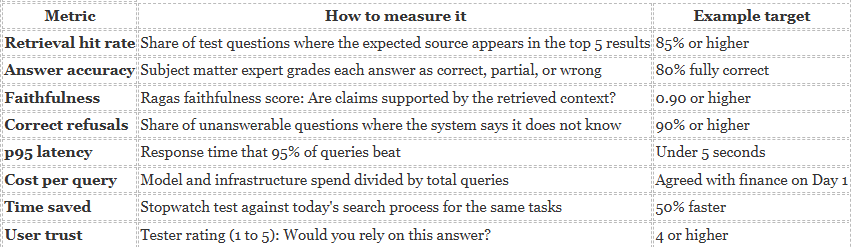
Targets are illustrative starting points. Set yours with the business owner on Day 1 and don’t move them later.
Day 1 is also when you agree on data handling. Which documents are approved for the pilot, who can see the answers, and what must never leave your environment? If you keep an AI risk register, log the pilot there now. Our guide to the AI risk register shows how to balance speed with a zero-trust posture, and the NIST AI Risk Management Framework is a solid public reference. For a side-by-side view of the main standards, see our AI security framework comparison.
Day 2: Data curation and cleaning
Gather a limited, high-quality dataset. Fifty to one hundred documents is plenty for a RAG pilot. Convert PDFs, Word files, and Markdown into clean, machine-readable text, then remove duplicates, outdated versions, and irrelevant pages. Two versions of the same policy are the fastest route to a confidently wrong answer.
Here is a useful sanity check. Anthropic notes that if your knowledge base is smaller than about 200,000 tokens, roughly 500 pages, you can sometimes skip retrieval and place the whole thing in the prompt. If your pilot corpus is that small and will stay that small, test the simpler option too. If it will grow, you need retrieval, and the pilot should prove it.
Day 3: Tech stack and environment
Spin up your RAG infrastructure, connect your model provider, and set up a secure vector index. Use what your platform gives you out of the box rather than building plumbing from scratch. Keep the pilot inside your own cloud tenant where possible, apply role-based access, and log every query and response from the very first day. Those logs become your Day 10 debugging material.
Gate 1: Scope locked. One use case, one approved dataset, named testers, and written targets.
Phase 2: Ingestion and baseline (Days 4 to 7)
Now you get the data into the system and measure, honestly, how well it performs before any tuning. That baseline is what makes your Day 12 improvements credible.
Day 4: Chunking and embedding
Chunking is how you break documents into retrievable pieces, and it quietly decides most of your retrieval quality. Too large, and each chunk mixes several topics. Too small, and it loses the context that gives it meaning. Microsoft’s Azure AI Search guidance suggests starting with chunks of about 512 tokens with a 25% overlap, which is about 128 tokens, then tuning from there. Use document structure wherever you can: split on headings and sections rather than raw character counts, and keep tables intact.
Then generate vector embeddings for every chunk and index them. Attach metadata to each one, including document title, section, version, owner, and date. You will lean on that metadata for filters and citations later.
Day 5: Ground truth creation
Write 20 to 30 realistic questions the way your users actually ask them, then manually map the correct answer and the exact source for each one. This test set is your evaluation baseline and the single most valuable artifact of the whole pilot. It also carries straight into production as a regression test.
Include a few questions the documents cannot answer. A good RAG pilot measures whether the system admits what it does not know, not just whether it gets the easy ones right. A simple format works fine:

Illustrative rows. The E01 row shows how the same format works for a document impact pilot.
Day 6: First run evaluation
Run every test question through the baseline system and grade two things separately. Retrieval: did the system pull the right chunk? Generation: did the model answer accurately from that chunk without inventing anything? Keeping them apart tells you where to spend Day 7.
Open source frameworks such as Ragas make this measurable. Context precision and context recall score the retrieval step, while faithfulness and response relevancy score the generated answer. Start with a simple retrieval hit rate, which takes a few lines of Python:
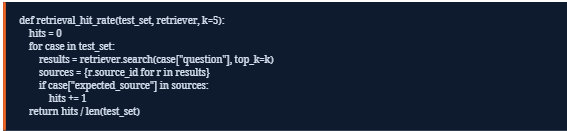
Pair that number with a subject matter expert grading each answer as correct, partially correct, or wrong. Human grading is slower than automated scoring, but for a 30-question set it takes about an hour and produces a number your executives will believe.
Day 7: Prompt engineering and optimization
Refine the system prompt so the model stays inside your approved sources and says so when it cannot answer. A simple version looks like this:

If retrieval was the weak spot on Day 6, adjust chunk sizes or test hybrid search, which combines keyword search such as BM25 with vector search. Keyword search catches exact terms like part numbers, product codes, and clause references that embeddings can miss. Anthropic’s published research on contextual retrieval shows how much these layers add up.
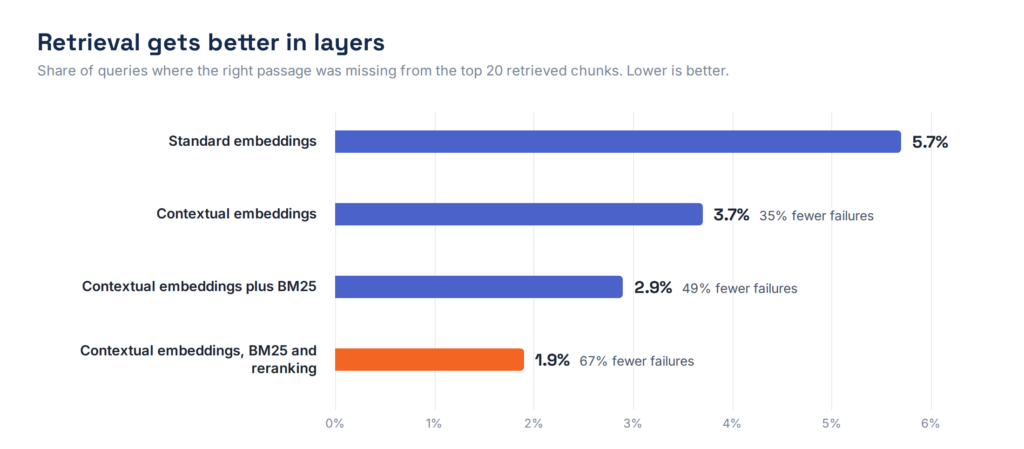
Figure 2. Retrieval failure rate in Anthropic’s contextual retrieval experiments. Source: Anthropic.
In those experiments, contextual embeddings cut retrieval failures by 35%, adding BM25 pushed the reduction to 49%, and adding a reranking step reached 67%. Microsoft has reported a similar pattern, with hybrid retrieval and reranking outperforming pure vector search on Azure AI Search. On AWS, Bedrock Knowledge Bases added advanced parsing, custom chunking options, and query reformulation for the same reason. You will not need every layer in a pilot, but you should know which one to reach for when the Day 6 numbers disappoint.
Gate 2: Baseline score. You have a measured starting point for both retrieval and answer quality.
Phase 3: User testing and iteration (Days 8 to 11)
Put the system in front of real users and watch how it handles real-world chaos. Your test set reflects how you think people ask questions. This phase shows you how they actually do.
Day 8: Interface and onboarding
Deploy a simple chat interface. Streamlit and Chainlit can turn a Python RAG pipeline into a usable web app in an afternoon, or you can use an internal tool your team already knows. Then brief your testers. Explain the scope, show them what the system is and is not designed to answer, and show them how to ask clear questions. Every answer should display its sources so testers can check them.
Day 9: Live testing and the feedback loop
Ask testers to use the system for their real daily tasks, not for invented quiz questions. Put a thumbs-up and thumbs-down button beside every response, with an optional comment box. Each thumbs-down becomes a labeled failure case you can investigate the next day.
Day 10: Log analysis and debugging
Review every failed query from Day 9 and put it in a category. Was the document missing? Did retrieval pull the wrong section? Did the model ignore its instructions? Each answer points to a different fix, and fixing the wrong layer burns time you do not have.
Figure 3. A three-question triage that routes every failed query to a content, retrieval, or generation fix.
Expect a good share of failures to be content gaps rather than AI failures. That is valuable on its own, because it tells you exactly what your documentation is missing, in your users’ own words.
Day 11: Final system tweaks
Apply quick, targeted fixes based on the logs: add a missing document, add metadata filters so questions about one product or region only search the right documents, adjust formatting instructions, or tighten the prompt. Then freeze the system. No changes after Day 11, or your final numbers stop meaning anything.
Gate 3: User feedback in. Every failure is categorized, and the fixable ones are fixed.
Phase 4: Evaluation and roadmap (Days 12 to 14)
This is where you measure the outcome and build the business case for what comes next.
Day 12: Final quantitative evaluation
Rerun the exact test set from Day 5 against the frozen system. Measure final accuracy, retrieval hit rate, faithfulness, and correct refusals, along with p95 latency, the response time that 95% of queries beat, and cost per query, which is total model and infrastructure spend divided by the number of queries. Compare everything with your Day 6 baseline and your Day 1 targets.
Day 13: Qualitative user interviews
Sit down with each tester for 15 minutes and ask three questions. Did this save you time? Did you trust the answers? What is missing? Trust is the metric dashboards cannot capture, and it is usually the one that decides adoption.
Day 14: Executive readout and next steps
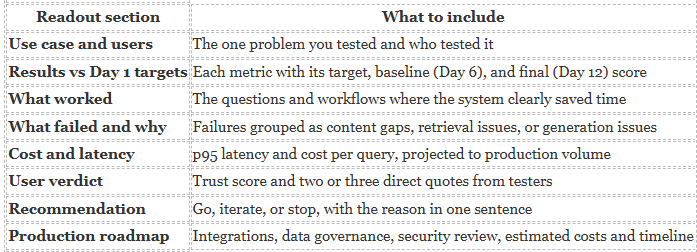
Compile a one-page executive summary that maps the pilot’s performance against the Day 1 metrics, then present a production roadmap with estimated costs, data governance requirements, and a realistic timeline for scaling. If the story needs ten slides, the pilot was not focused enough. Here is a template:
If the recommendation is to scale, the next question is usually whether to build the production system in-house or work with a partner. Our build vs buy guide for enterprise AI walks leaders through that decision, and our piece on intelligent workflow design covers where AI should act and where people should decide.
Gate 4: Go, iterate, or stop. A clear recommendation backed by your own numbers.
Quick start RAG pilot execution matrix
Print this, pin it to the project channel, and check it every morning.

How to make the go, iterate, or stop call
The final decision should feel almost mechanical by Day 14. If it does not, go back to your Day 1 targets.

A stop is not a failure. A two-week RAG pilot that prevents a six-figure project from heading in the wrong direction is one of the best returns you will ever get on AI spend.
Common RAG pilot mistakes to avoid
- Testing too many documents. More data rarely helps a pilot. It mostly adds noise, duplicates, and slower debugging.
- Skipping the ground truth set. Without it, every result is an anecdote and Day 14 becomes a debate.
- Grading only the final answer. Score retrieval and generation separately, or you will tune the wrong layer.
- Letting testers wander out of scope. Questions outside the use case will fail, and those failures will be blamed on the AI.
- Ignoring cost and latency. An accurate answer that takes 40 seconds, or costs too much per query, will not survive production.
- Not writing anything down. Every setting, lesson, and failure category is part of what you carry into production.
Frequently asked questions about RAG pilots
How long should a RAG pilot take?
Two weeks is enough for a focused RAG pilot with one use case, 50 to 100 documents, and three to five testers. Longer pilots usually suffer from scope creep rather than produce better results.
How many test questions does a RAG pilot need?
Start with 20 to 30 realistic questions with known answers and sources, including a few the documents cannot answer. Expand the set as you move toward production.
What metrics should a RAG pilot measure?
Retrieval hit rate, answer accuracy, faithfulness, correct refusals, p95 latency, cost per query, time saved, and user trust.
What is the difference between a RAG pilot and a document impact pilot?
A RAG pilot answers questions from approved documents. A document impact pilot identifies which documents are potentially affected by a change, such as an engineering change, and measures how completely it finds them for human review.
Do we need RAG if we only have a few documents?
Maybe not. Anthropic notes that knowledge bases under about 200,000 tokens can sometimes go directly into the prompt. RAG earns its place when your content is larger or growing.
The bottom line
A 14-day RAG pilot is not about proving that AI is impressive. Everyone already knows it can be. It is about proving, with your own documents, your own people, and your own numbers, that it is useful, trustworthy, and worth scaling.
Narrow the scope, build the test set, measure retrieval and generation separately, and let real users try to break it. Do that, and your pilot ends with a decision instead of a demo.
Are you planning your first pilot? At Creative Bits AI, we help teams plan and run focused RAG and document impact pilots on the platforms they already use, including AWS through our AWS services. Our systems answer from approved sources, identify potentially affected documents, and keep people in control of review and approval. Send us your answers to the three questions above, and we will map out what your first 14 days could look like, subject to a short technical discovery. Book a consultation or request a demo.